Free Forever No ads on the remote tab — Works with all Roku models
Free Android App

Control Your Roku TV
Right From Your Phone

Lost your Roku remote? No problem. Our free app turns your Android phone into a full-featured Roku remote — no ads, no setup hassles, just instant control.

500+ Downloads
4.7★ Rating
Free Forever
All Roku Models
No ads on remote tab WiFi auto-discovery All Roku models Quick action macros

Works perfectly with

Supported TV Brands: TCL, Hisense, Onn, Sharp
Everything You Need

Why Choose Roku TV Remote Control?

A complete remote replacement packed with smart features — all for free.

Works Without Physical Remote

Control your Roku TV even if your physical remote is lost or broken. Just connect to the same WiFi network and you're in.

Fast & Responsive

Instant response with ultra-low latency over your local WiFi. Enjoy buttery-smooth control of your Roku streaming experience.

Easy One-Tap Setup

Simple, intuitive interface designed for everyone. The app auto-discovers your Roku TV over WiFi — no IP addresses or manual config.

Secure & Private

Your connection stays on your local network. We collect zero personal data from your Roku TV and send nothing to external servers.

All Roku Models Supported

Works with Roku TV, Roku Stick, Roku Ultra, Roku Express, and all Roku OS 5.0+ devices.

Supported Roku TV Brands: TCL, Hisense, Onn, Sharp

Completely Free — No Ads

Download, install, and use 100% free. The remote tab is completely ad-free. No hidden costs, no premium tier needed.

Smart Keyboard Sync

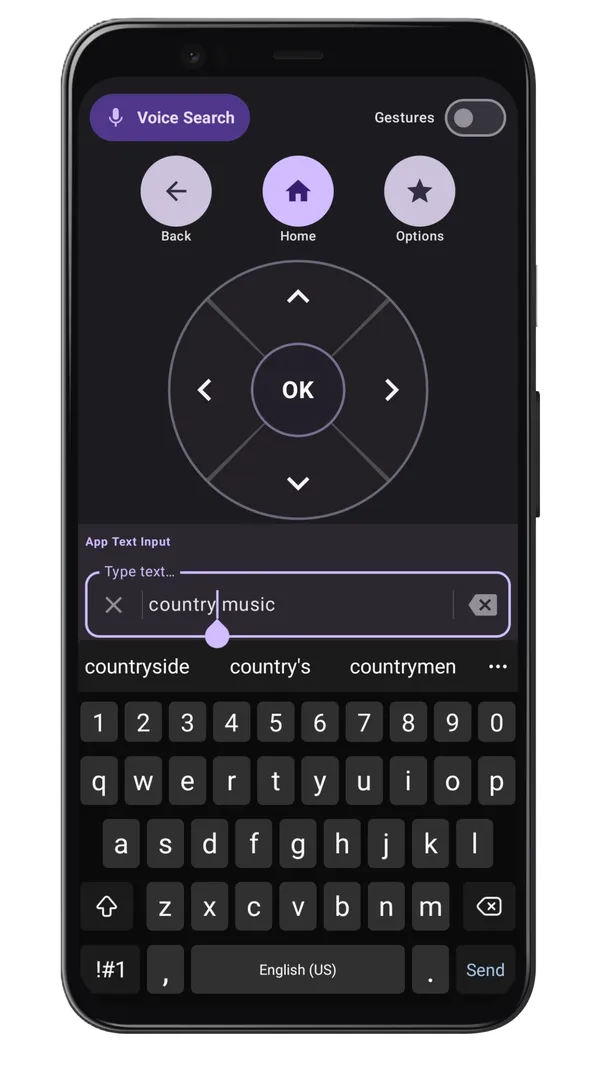
Type searches on your Roku TV using your phone's keyboard. The app syncs text in real time — no more hunting individual letters with the d-pad.

Quick Action Macros

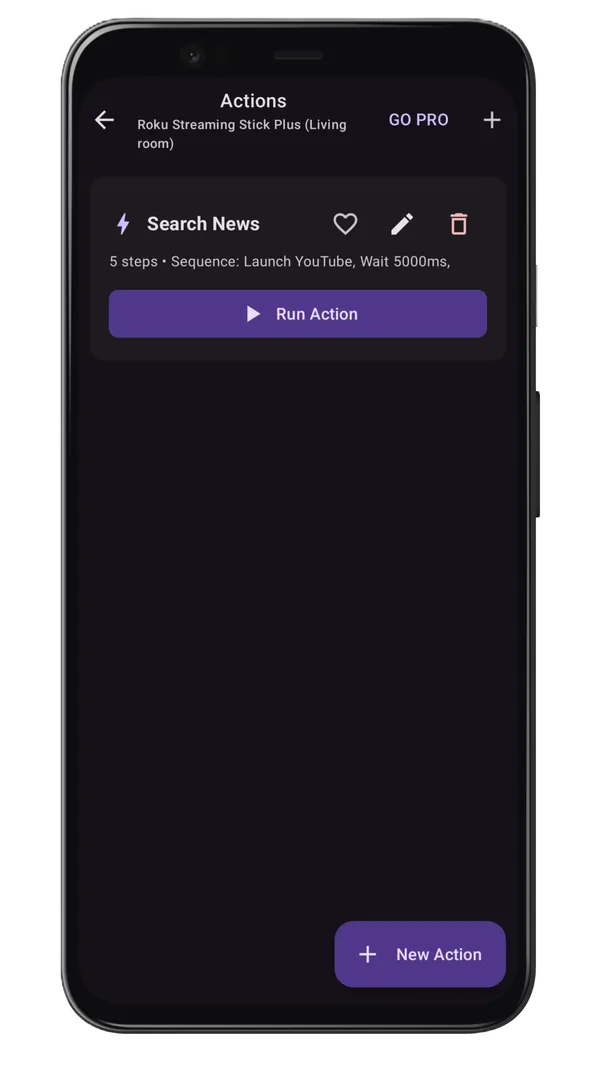
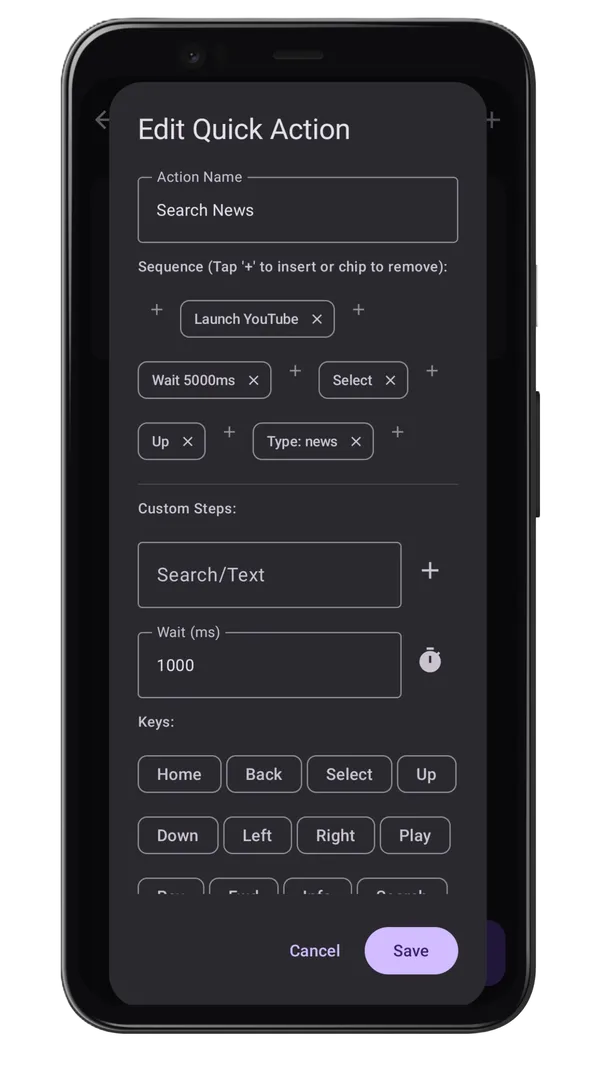
Create one-tap macros for common tasks — launch Netflix, set the volume to your preferred level, or switch inputs with a single button.

App Shortcuts

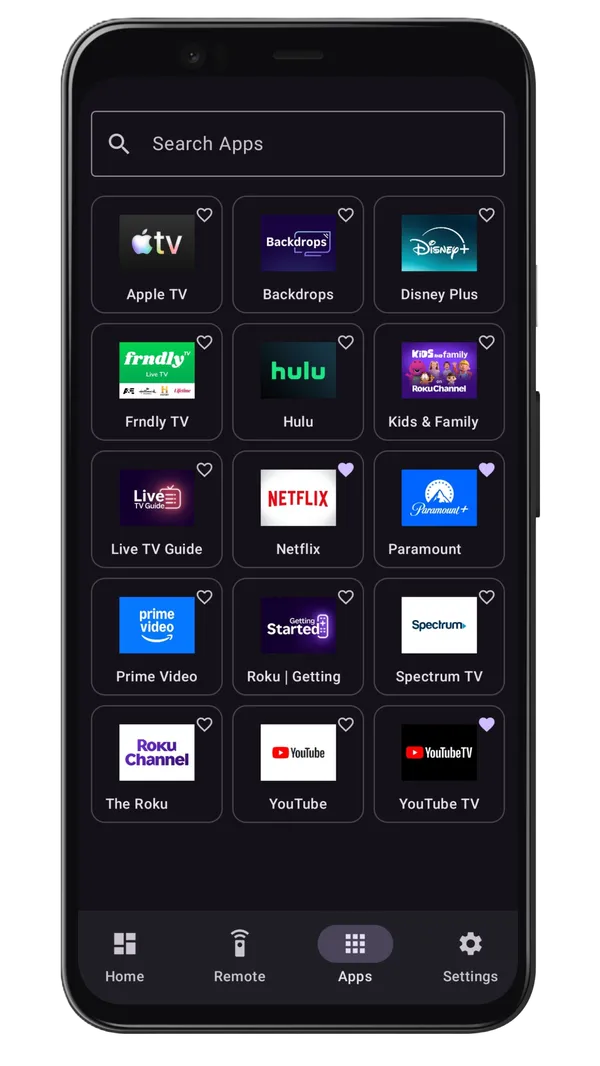
Pin your favorite streaming apps — Netflix, YouTube, Disney+, and more — for instant one-tap launching from the home screen.

App Preview

See It In Action

A clean, intuitive interface that puts full Roku control at your fingertips.

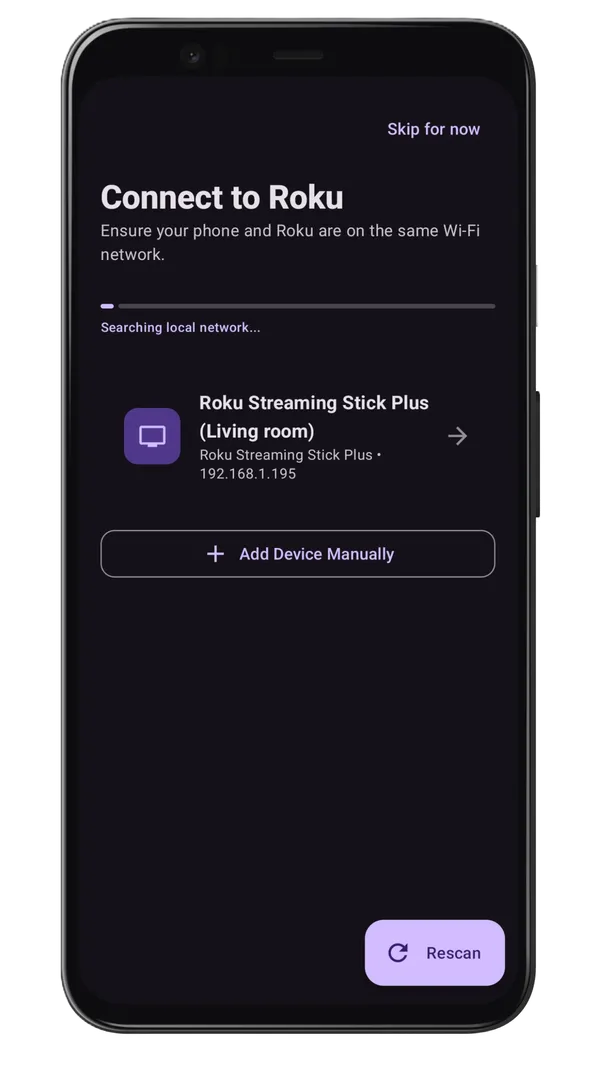
Roku TV Remote Control App Home Screen - Device Discovery

Find Your Roku TV

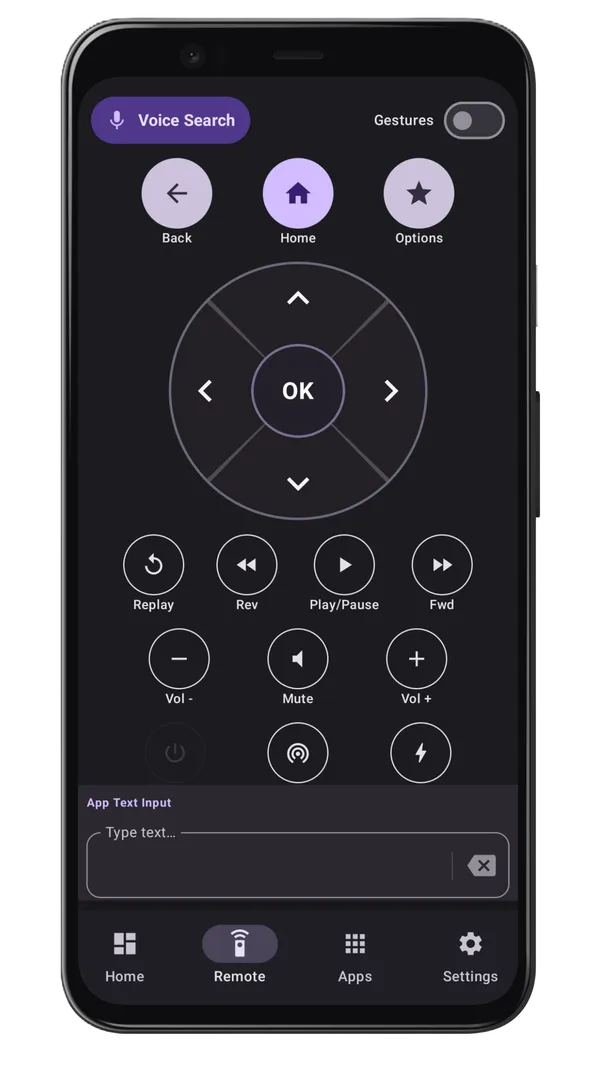
Roku TV Remote Control App Remote Control Interface

Control & Navigate

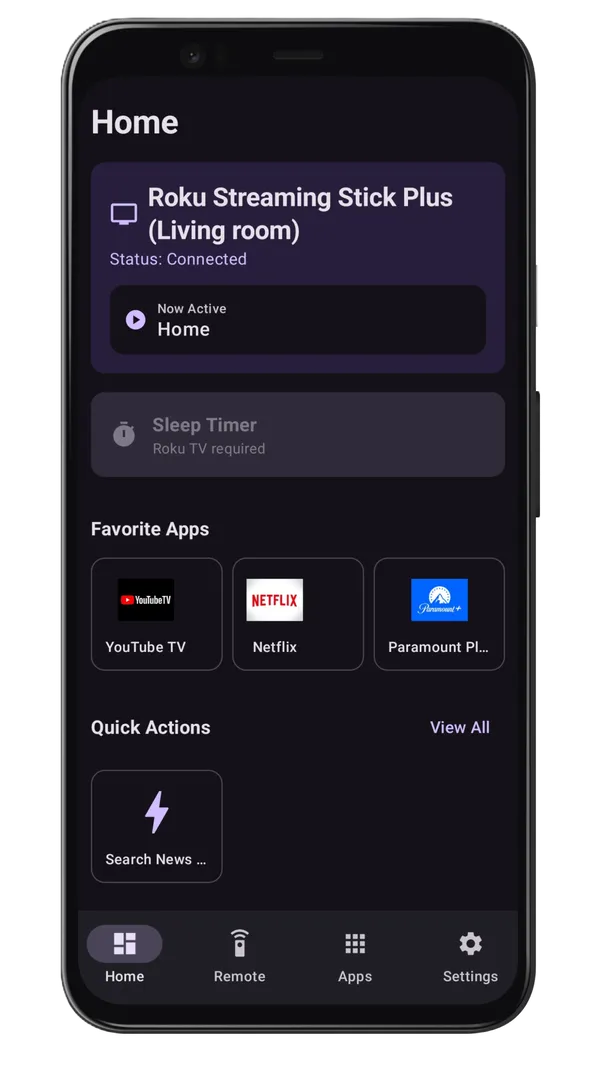
Roku TV Remote Control App Home tab - Status and Favorites

Status & Favorites

Roku TV Remote Control App Keyboard auto sync - Fast Text Input

Keyboard Sync

Roku TV Remote Control App shortcuts - Quick Access to Favorite Apps

App Shortcuts

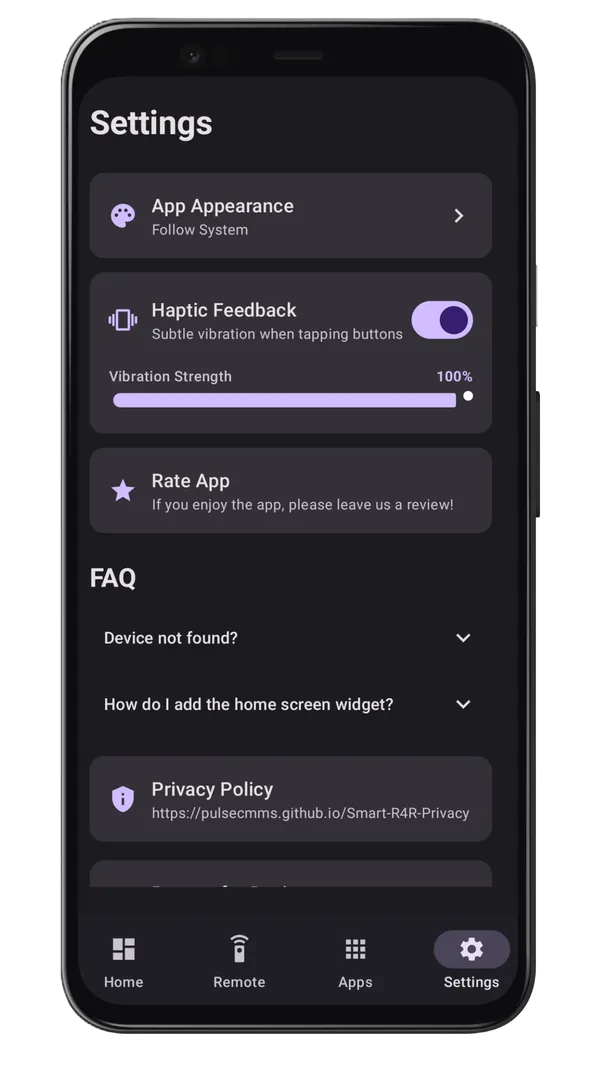
Roku TV Remote Control App Settings tab

Settings

Roku TV Remote Control App Quick Actions

Quick Actions

Roku TV Remote Control App Customize Quick Actions

Customize Macros

User Reviews

What Our Users Say

Real feedback from the Google Play Store

★★★★★
"

I've used this app for a while now, and it works great and looks good. I really like that there are no annoying ads, which is a big problem with other apps like this. I totally recommend this app to Roku users. I'm even thinking about getting the ad-free version since it's a one-time payment. Good job, developer!

★★★★★
"

This App is fantastic and super easy to use. Highly recommended.

★★★★★
"

Love the smart keyboard feature. It actually syncs properly without weird text glitches. The macro feature is a nice bonus too. Definitely useful if you lose your remote often.

Free Roku TV Remote Control — No Ads on Remote Tab

If your physical Roku remote is lost or not working, you can still control your Roku TV using your Android phone. Roku TV Remote Control app helps you reconnect quickly and continue streaming without frustration.

How to Get Started

  1. Download the Roku TV Remote Control app from Google Play Store
  2. Make sure your Android phone and Roku TV are on the same WiFi network
  3. Make sure 'Control by Mobile Apps' is set to 'Permissive' on your Roku TV (Settings › System › Advanced System Settings › Control by Mobile Apps)
  4. Open the app and it will automatically discover your Roku device
  5. Select your device and start controlling your TV
  6. Enjoy seamless Roku remote control from your phone
★★★★★
★★★★★
Based on user reviews
✅ Verified Safe

Common Issues Resolved

Download on Google Play
Key Features

Want to Control Your Roku TV From Your Phone?

Whether you lost your Roku remote, want to avoid buying a replacement, or just prefer using your phone — the Roku TV Remote Control app is the easiest, most feature-rich way to control your Roku TV from your Android phone.

🔤
Keyboard Sync

Type with your phone keyboard on Roku TV

📲
Auto Discovery

Finds your Roku automatically over WiFi

🚫
No Ads

Remote tab is completely ad-free

Quick Actions

One-tap macros for common tasks

Learn How It Works →
Got Questions?

Frequently Asked Questions

Can I use this app without a physical remote?

Yes! That's the main benefit of Roku TV Remote Control. As long as your Roku TV is connected to the same WiFi network, you can control it completely using the app, even if your physical remote is lost or broken.

Does the app support Roku TV volume control?

Yes, supported Roku TVs can control volume directly from the app. You can adjust volume, navigate channels, launch apps, and perform all remote functions through the app.

Is this app free?

Yes, the app is completely free to download and use. We believe everyone should have access to an affordable Roku remote solution.

Which Roku devices are supported?

Roku TV Remote Control works with Roku TV, Roku Streaming Stick, Roku Ultra, Roku Express, and all other Roku devices running Roku OS 5.0 or higher.

Do I need to buy a physical remote if I use this app?

No, you don't need to buy an expensive physical remote. The app provides all the functionality you need to control your Roku device.

Is my connection secure?

Yes, your connection is secure and private. The app connects directly to your Roku device over your local WiFi network. We don't collect any personal data from your Roku TV or send any information to external servers.

Have more questions? Contact us or visit our full FAQ page.

Available Now

Ready to Control Your Roku TV?

Download Roku TV Remote Control now and say goodbye to lost remotes forever.

Works Offline on WiFi 100% Private Zero Setup Needed
★★★★★
★★★★★
4.7/5 Google Play
🚀 Join 500+ users
App Icon Roku TV Remote Control Download Free

Start controlling your Roku TV today

Auto-discovers your device. No ads. Works offline over WiFi. iOS & Android.

Google Play